Skip to content
Construction project intelligence

Your project documents, answered. Cited. In minutes.

IntelMS turns every drawing, spec, RFI, submittal and change order into an instant, grounded answer with an exact citation — emailed back to your team. It reads the latest revision, flags conflicts, and refuses to guess on anything contractual, code, or safety-critical.

No credit card to start the pilot · Drafts by default, never auto-sends without proof · Your documents stay isolated to your project

 Re: Bid leveling — 1450 Birchwood Commerce Way electrical package
Incoming email from the Project Manager:
"I've attached the IFC drawings and all the quotes we received for this project. Pick the best candidate and check whether they've included the most complete price."
Answer

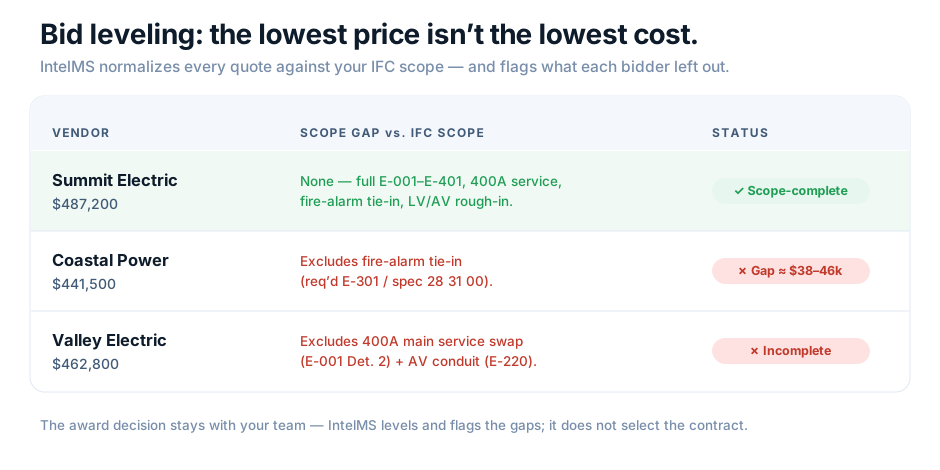
Leveled against the IFC electrical scope, Summit Electric is the only fully scope-complete bid — it prices the entire package with no exclusions. The two lower quotes each omit a required scope item that would almost certainly return as a change order, so they aren't true apples-to-apples. The award decision is yours — IntelMS levels and flags the gaps; it doesn't select the contract.

Leveling vs. IFC scope
VendorQuotedScope gap vs. IFC
Summit Electric$487,200None — full E-001–E-401, 400A service, fire-alarm tie-in, LV/AV rough-in
Coastal Power$441,500Excludes fire-alarm tie-in (req'd E-301 / spec 28 31 00) — gap ≈ $38–46k
Valley Electric$462,800Excludes 400A main service swap (E-001 Det. 2) + AV conduit (E-220)
Sources

Summit_Electric_Quote.pdf p.1–3 · Coastal_Power_Quote.pdf p.2 (exclusions) · Valley_Electric_Quote.pdf p.1 · IFC scope E-001, E-220, E-301, E-401 · Spec 26 05 00, 28 31 00.

Revision used

IFC set Rev 3 (2026-04-18) · quotes as received.

Confidence

Medium  Completeness judged against the IFC scope; each exclusion is stated explicitly in the quote, but final scope interpretation is yours.

Flags

⚠ Needs human review  Awarding a bid is a contractual decision — IntelMS does not award. Coastal's apparent low price omits a code-required fire-alarm tie-in; compare like-for-like before deciding.

$2,000–$3,000 typical fully-loaded cost of a single RFI
6–10 days average RFI turnaround across the industry
500–800 RFIs on a typical commercial project
Proven on a live job

See how IntelMS answered a live electrical scope at 2323 Arthur Court (Kelowna, BC) for GC Chriscan Construction — cited, revision-aware, and escalating to a human instead of guessing on code and cost.

Read the case study →
The hidden tax on every project

Answers are buried in folders. People are the search engine.

On an active job, every "what's the rating / which revision governs / does this CO move the schedule" question stops someone's work while they dig through folders, find the current revision, and write back hours later. Poorly managed RFIs routinely eat 1–3% of total project cost.

1–3%of total project cost lost to RFI churn, rework and standby labor.
61%of RFIs answered late, even against a 5-business-day target.
$30k–$100k+in avoidable cost per year from delays beyond direct admin time.
IntelMS construction project intelligence agent reviewing cited drawings, specs and change orders
Meet your agent

Like a senior PM who never guesses — and always shows the source.

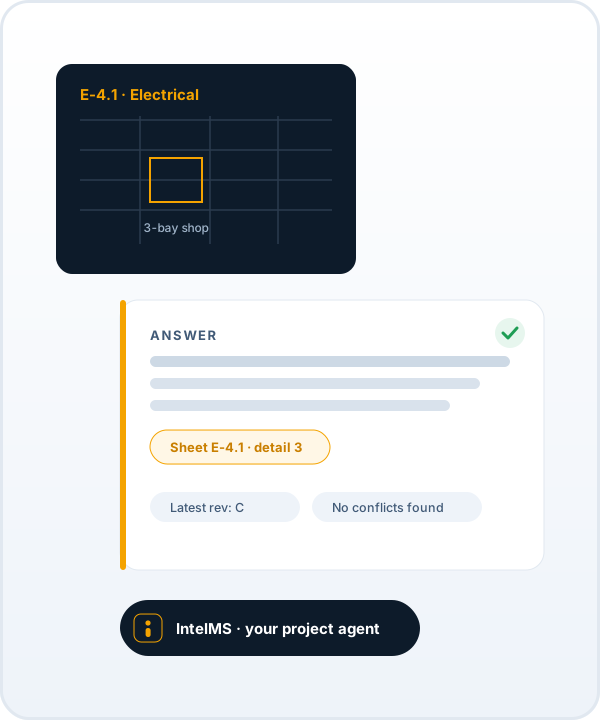
IntelMS reads your whole project record and answers like the most meticulous person on your team: it reads the latest revision, cites the exact sheet and spec, flags conflicts, and refuses to guess on anything contractual, code, or safety-critical.

  • Answers from your documents only — never invents a dimension, model or date
  • Every claim carries an exact citation you can open and check
  • Escalates risky calls to a human instead of guessing
  • Gets sharper on your job the more your team uses it
Annotated IntelMS answer showing the answer, exact sources, revision used, confidence level and a needs-human-review flag
Why it beats pasting a question into ChatGPT

Built to be trusted on a jobsite

A generic chatbot invents project facts. IntelMS only speaks from your project record — and tells you when it can't.

Document types IntelMS reads: drawings, specs, RFIs, change orders and submittals
📎

Grounded & cited

Every fact points to the exact sheet, detail, spec section, or change-order number. If it can't cite it, it won't say it.

🔄

Revision-aware

Always answers from the latest issued revision and flags superseded drawings — the single most dangerous mistake in the field.

⚠️

Detects conflicts

When the spec and the drawing disagree, it surfaces both with citations instead of silently picking one.

📊

Levels bids

Attach the drawings and every quote; it normalizes them against your scope, flags who's missing what, and finds the most complete price — without awarding the contract.

🛑

Escalates, never guesses

Contractual, cost, code, or safety questions are drafted "Needs human review" — nothing risky is ever auto-sent.

🔒

Tenant-isolated

Each project's documents are walled off. One client's data is never visible to another — by construction, not by policy.

🧾

Complete timeline of record

Every question, answer, source and revision is logged in order — export it as a cited packet for one-click closeout or airtight dispute defense. See how →

🏢

Scales to the enterprise

One centralized IntelMS across departments, sites and projects — with sensitivity rings for PII, privileged and confidential data. Enterprise & logistics →

🔄

Learns & gets sharper

Every correction and acceptance is captured, so accuracy compounds on your documents over time — the longer you use it, the better it gets.

IntelMS bid leveling: three subcontractor quotes normalized against IFC scope, flagging Summit Electric as the only scope-complete bid

Bid leveling normalizes every quote against your IFC scope — and flags what each bidder left out. It does not award the contract.

From first RFI to final closeout — and beyond construction

Every question tracked, every answer accountable

IntelMS doesn't just answer once and forget. It keeps the running record of your project — and the same engine works for any corporate team that needs cited answers from its own documents.

🗓️

Project timeline

A running, dated timeline of every milestone, RFI, change order and decision — assembled from your documents so the whole history is one scroll away.

🗂️

Question & answer history

Every question ever asked and its cited answer, searchable. Prior decisions are reused instead of re-litigated, and nothing falls through.

✉️

Flexible delivery

Send any answer to one person or the whole team — To, CC and BCC, multiple recipients, all from your approved sender list. The right people stay in the loop.

📈

Reports on demand

Daily and weekly digests plus exportable reports: open items, response times, budget status and disputes — the project on one page.

💸

Budget & over-budget tracking

Tracks budget line items and change orders against contract value, and flags overruns early — before a number becomes a surprise.

📦

Closeout packages

Assembles the cited closeout package — O&Ms, warranties, as-builts, approvals — so handover is a click, not a scramble.

⚖️

Dispute defense

Compiles a cited evidence packet — the timeline, the documents, the decisions — so any claim or dispute is backed by the record.

🏢

Corporate & enterprise

Not just construction. Legal, HR, finance and ops teams get the same grounded, cited answers from their own documents — isolated per department. Explore enterprise →

From signup to first answer in a day

How IntelMS works

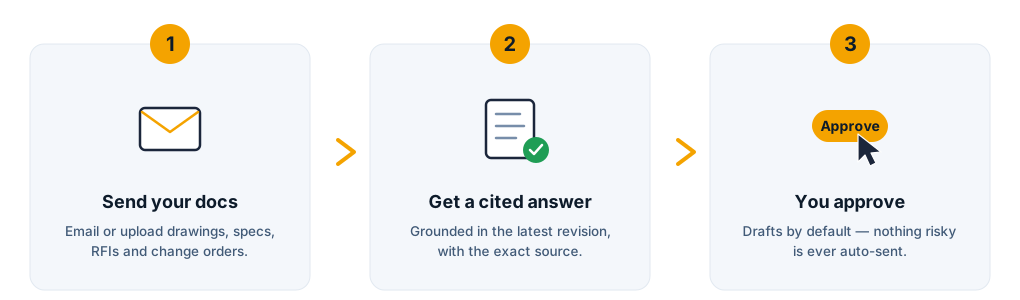
How IntelMS works in three steps: send your docs, get a cited answer, you approve

Send your docs

Email or upload your drawings, specs, ROs, submittals and change orders. We categorize, version and index every file.

Ask by email

Anyone on your approved sender list emails a question to your project address — just like asking a colleague.

Get a cited answer

IntelMS retrieves from the latest revision, reasons, runs the verify gate, and replies with a grounded Answer Block.

You stay in control

Drafts by default. Auto-send turns on per project only after measured accuracy earns it. Full audit trail of every Q&A.

Simple, flat pricing — unlimited users

Plans that pay for themselves on the first RFI

One avoided RFI ($2,000–$3,000) covers months of IntelMS. Pick a plan, or start with a free 14-day pilot on one real project.

Basic

For a single active project or a small sub keeping one job organized.

$199 CAD/mo
  • 1 active project
  • Up to ~60 answered questions / mo
  • Email Q&A with grounded citations
  • Revision awareness & conflict flags
  • Unlimited users & document uploads
  • Bid leveling & proactive alerts
  • Auto-send (drafts only)
Choose Basic
MOST POPULAR

Standard

For a GC or sub running several jobs at once. The everyday workhorse.

$499 CAD/mo
  • Up to 3 active projects
  • Up to ~150 answered questions / mo
  • Everything in Basic, plus:
  • Bid leveling & scope-completeness checks
  • Proactive alerts (conflicts, superseded, renewals)
  • Priority email turnaround
  • Monthly accuracy & activity report
Choose Standard

Premium

For multi-project GCs that want earned auto-send and white-glove setup.

$999 CAD/mo
  • Unlimited active projects
  • Up to ~400 answered questions / mo
  • Everything in Standard, plus:
  • Earned auto-send (per project, accuracy-gated)
  • Corporate vertical add-ons (PII / privilege rings)
  • Dedicated onboarding & quarterly review
  • Priority support SLA
Choose Premium

14-day free pilot on one real project · One-time $750 white-glove setup waived on annual plans · 30-day money-back guarantee · Cancel anytime. Prices in CAD.

★ Add-on · works with any plan

Add FrontOffice — the AI back office

BuildAnswer reads your project. FrontOffice runs your office: it answers new leads in minutes, drafts quotes in your voice, chases unpaid invoices, and books the work — drafts by default, you approve every send.

Explore FrontOffice +$199 CAD/mo bundled · or $349/mo standalone
In the add-on
  • Speed-to-lead inbox triage
  • Quotes drafted from your rate card
  • AR matching & reminder ladder
  • Scheduling, records, reviews & social
  • Draft-by-default safety
See FrontOffice pricing

See it answer a question from your own job

Send us one real project's current documents. Within a day you'll get cited answers to your team's actual questions — or we'll tell you exactly what's missing.

Start your free pilot
Questions

Frequently asked

Will it ever make up an answer?

No. IntelMS states a project fact only when it can cite the source. If it can't find support in your documents, it says so and names the document it would need. Anything contractual, cost, code, or safety-related is drafted for human review rather than answered outright.

Can it really compare our subcontractor quotes?

Yes — that's bid leveling. Attach the IFC drawings and every quote, and IntelMS normalizes the bids against your project's scope, shows exactly what each bidder included or excluded, and identifies the most scope-complete price. It will not award or pick the winner for you — that contractual decision always stays with your team.

Does it auto-send replies to my clients?

Not by default. Every answer is a draft you approve. Auto-send is unlocked per project only after IntelMS proves measured accuracy on your job's question set — and never for high-risk categories.

Is my project data shared with other clients?

Never. Each project's documents are isolated. The system cannot reference or infer facts from any project other than your own.

What documents can it read?

Architectural, structural, MEP, electrical and low-voltage drawings; spec books (CSI MasterFormat); change orders and directives; RFIs and responses; submittals and shop drawings; equipment cut sheets; schedules; and contract documents.

How long until it's useful?

Usually within a day of sending your first project's documents. The free 14-day pilot is the fastest way to see cited answers to your team's real questions.

What if I go over my monthly question limit?

We'll let you know before you hit it and you can upgrade anytime — the next tier takes effect immediately, prorated.

Free 14-day pilot — one real project Start pilot